Managing SMTP servers
SMTP stands for Simple Mail Transfer Protocol. SMTP is the de facto standard for e-mail transmissions across the Internet. This will allow you to e-mail your reports to mail recipients without the need for an existing mail client.
Note: Sending email through a saved SMTP server requires a Standard or Site license — see Emailing a report.
To manage the list of SMTP servers:
- On the ribbon, choose Report Viewer › View › Settings. The Settings window opens.
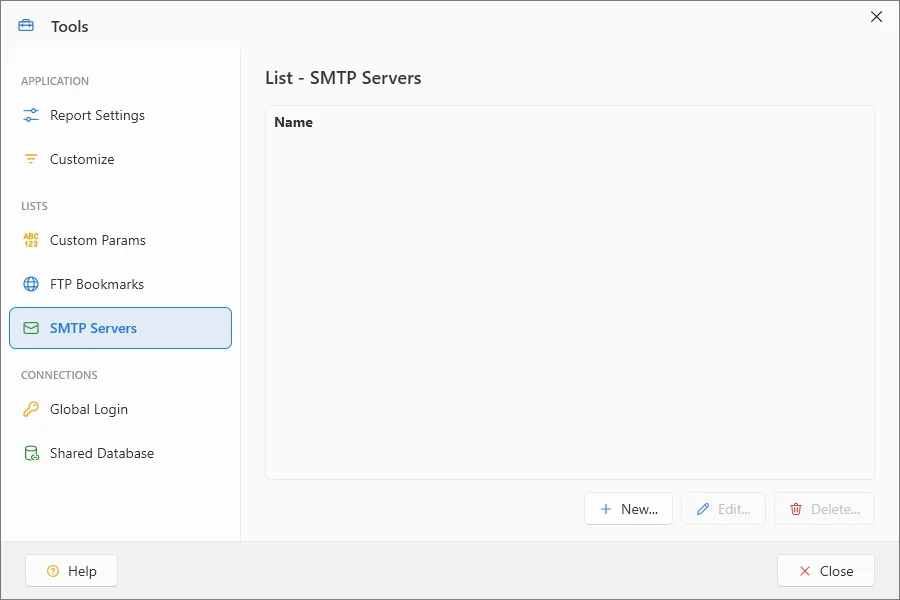
To create a new SMTP server:
- Select the SMTP Server section in the Settings window.
- Click the New button (See Working with SMTP Servers).
To modify an existing SMTP server:
- Select the SMTP Server section in the Settings window.
- Highlight the SMTP server you want to modify.
- Click the Edit button (See Working with SMTP Servers).
To delete an existing SMTP server:
- Select the SMTP Server section in the Settings window.
- Highlight the SMTP server you want to delete.
- Click the Delete… button.
- Click Yes when the confirmation dialog box appears. The SMTP server will be permanently removed from ViewerFX for Crystal Reports.
Note: This cannot be undone — a deleted SMTP server must be recreated.