About the work area
The ViewerFX for Crystal Reports window includes a report pane that displays Crystal Report documents. The left side includes the Favorites Center, a sidebar with favorites and history trees that helps store and organize Crystal Report documents. The ribbon at the top of the window — with its two tabs, Report Viewer and Preview — and the status bar at the bottom of the window provide the other controls that you use to work with reports.
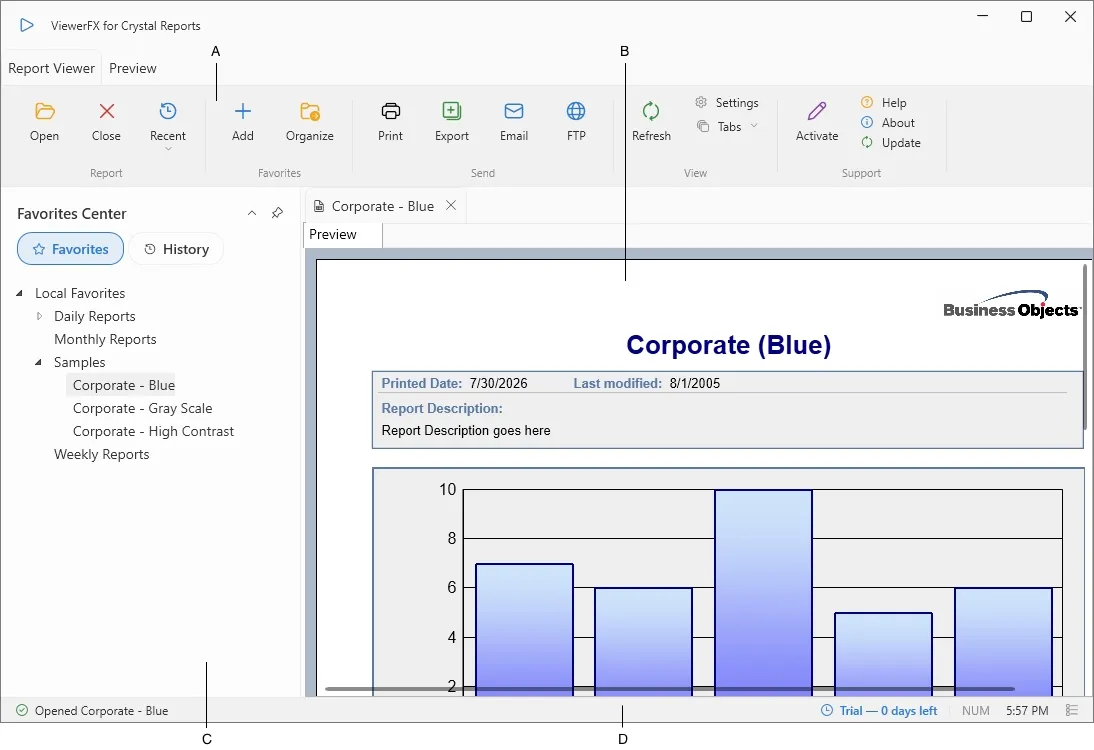
A. Ribbon, B. Report pane, C. Favorites Center, D. Status bar
Collapsing the Favorites Center
Section titled “Collapsing the Favorites Center”You can collapse the Favorites Center to give the report pane more room. When it is collapsed, it shrinks to a narrow rail at the left edge of the window; move the pointer over the rail, or click it, to slide the panel out temporarily. Use the pin control to dock the panel open again. ViewerFX keeps your choice, so the panel stays collapsed or pinned the next time you open it.
Keyboard shortcuts
Section titled “Keyboard shortcuts”A few common actions have keyboard shortcuts:
- Ctrl+O — open a report
- Ctrl+P — print the current report
- F5 — refresh the current report
- F1 — open help